MaxAuditor ProRevisione web formale
HomeCome si usa?Informativa sulla privacyInformativa sui cookieTermini d'uso
Come si usa?

Come si usa?

This page explains, in the shortest practical form, how to use MaxAuditor Pro to start a review, read the output, and move to the official contact route when follow-up is needed.

Torna alla piattaforma

Come si usa?

The usage steps are simple: enter a public domain, complete verification, run the review, and read the resulting technical output across headers, privacy visibility, cookie controls, and discovery resources.

Contatti

Enter the domain to review

Type the public website address you want to review into the main input field.

  • Only live, publicly reachable addresses should be submitted.
  • Use the real production address so redirect and HTTPS behavior can be observed correctly.
  • Admin panels, login-only pages, and internal network addresses should not be used as targets.
HomeRevisione web formale
Complete verification

The request enters processing only after it passes the verification layer that protects service integrity.

  • The review will not start until verification is complete.
  • This step limits automated misuse and excessive submission attempts.
  • Unusual repetition or threshold-triggering traffic can be paused temporarily.
TurnstileRevisione web formale

Run the review

The platform checks public technical signals such as security headers, HTTPS posture, robots.txt, sitemaps, visible privacy links, cookie signals, and tag visibility.

  • The review is limited to publicly visible technical evidence.
  • Authenticated private areas are not entered.
  • Results are shown as readable report cards and summary indicators.
Informativa sulla privacyInformativa sui cookieTermini d'uso

Read the report and take the next step

Interpret the output in terms of header gaps, policy visibility, redirect structure, and search-discovery resources before deciding what to update.

  • Address critical findings and explicit gaps first.
  • Run internal review with the relevant technical or compliance team before making changes.
  • Use the official contact page for issue reports, correction requests, or general communication.
ContattiRevisione web formale

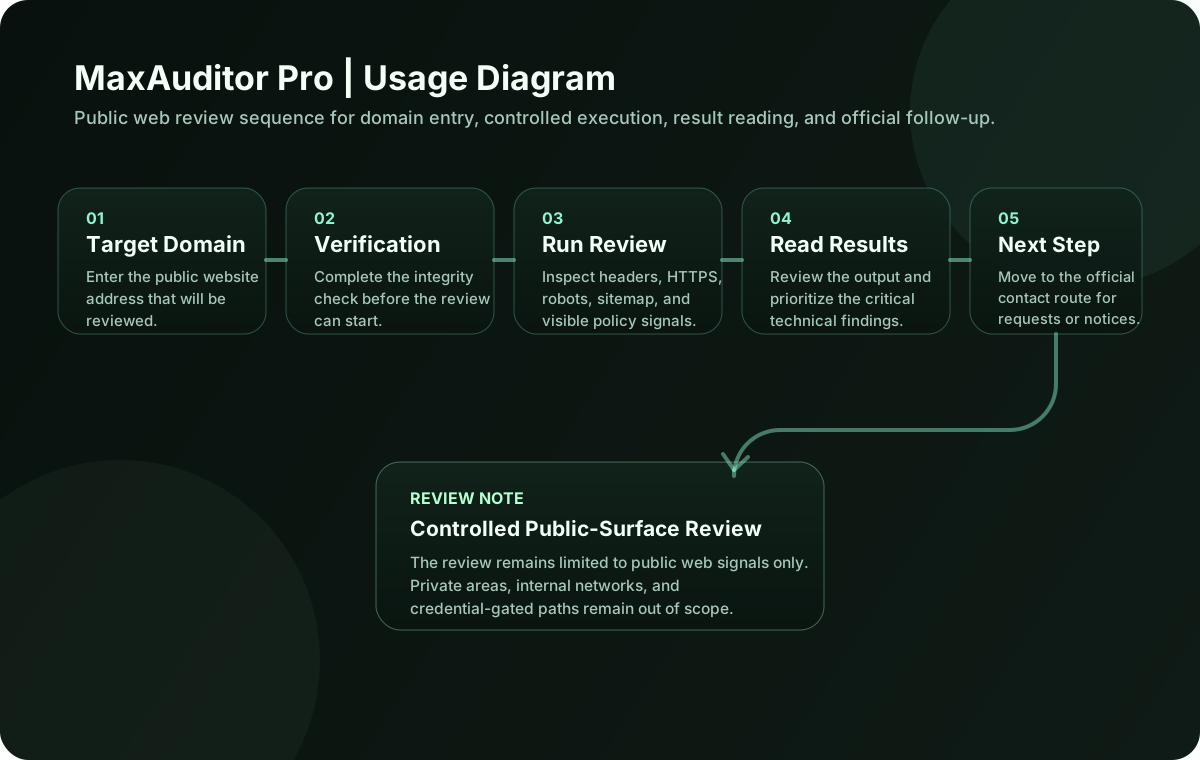
Usage Diagram

The diagram below summarizes the MaxAuditor Pro usage steps in a clean, balanced sequence.

Come si usa? UML
The diagram below summarizes the MaxAuditor Pro usage steps in a clean, balanced sequence.
Revisione formale dei segnali web pubblici per sicurezza, privacy, visibilità di ricerca e trasparenza editoriale.
HomeCome si usa?Informativa sulla privacyInformativa sui cookieTermini d'usoContatti
© 2026 MaxAuditor Pro•All rights reserved.